
Helpful Tools and Design
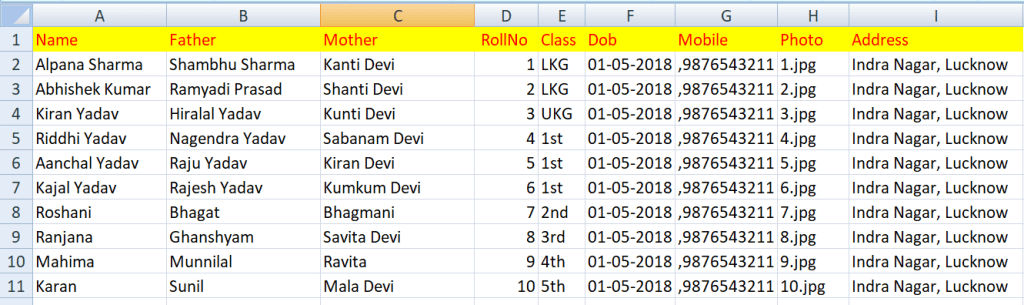
Student ID Card Excel Data Format
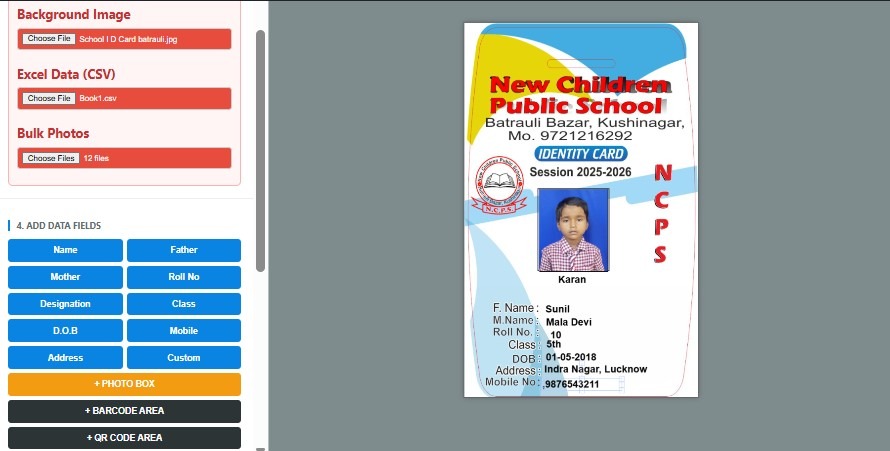
School ID Card Generator – Create & Print Bulk Student ID Cards Online
Creating student ID cards for an entire school can be a time-consuming task when every card has to be designed and edited separately. A school may have hundreds or even thousands of students, and entering each student’s name, class, roll number, photograph, date of birth and other information manually can lead to mistakes and unnecessary work.
A School ID Card Generator makes this process much easier. Instead of designing every card one by one, you can create a professional student ID card design, upload student information, add photographs and generate multiple ID cards from the same design.
The CSC Designer Student ID Card Generator is designed for schools, teachers, computer operators, coaching institutes, colleges and other educational organizations that need to create student ID cards quickly. The tool provides options for card dimensions, font style, text color, background image, student data, bulk photos, photo boxes, barcode, QR code and bulk export.
Whether you need one student ID card or a large number of cards, an online ID card generator can help simplify the complete design and generation process.
What is a School ID Card Generator?
A School ID Card Generator is an online tool or software that allows schools and educational institutions to create student identity cards using a predefined or customized design.
Instead of creating each card manually in Photoshop, CorelDRAW, Word or another design application, you can prepare the card layout once and then add student information to generate individual cards.
A typical school ID card may contain:
School name
School logo
Student photograph
Student name
Father’s or mother’s name
Admission number
Roll number
Class and section
Date of birth
Mobile number
Address
School session
Principal or authorized signature
Barcode
QR code
Other custom information
The main advantage of a student ID card generator is automation. Once the design and required fields are prepared, student information can be used to create multiple cards without designing every card from the beginning.
Create Student ID Cards Online
With an online student ID card maker, schools do not necessarily need advanced graphic-design skills.
The basic process is simple:
Set the ID card dimensions.
Select the font size, style and color.
Upload the background design.
Upload student data.
Add student photographs.
Select the required data fields.
Add a photo box if required.
Add a barcode or QR code.
Generate the preview.
Export the finished ID cards.
This workflow is especially useful for schools that need to prepare ID cards at the beginning of a new academic session.
Instead of repeatedly opening a design file and changing student information, the same design can be used for an entire batch of students.
How to Use the CSC Designer School ID Card Generator
The CSC Designer School ID Card Generator provides several controls that allow you to prepare a customized student ID card.
The main sections of the tool include:
1. Set Card Dimension
The first step is to choose the required school ID card size.
You can enter the card width and height in millimeters according to your printing requirement. This is useful because different schools and printing setups may use different card dimensions.
Before designing the final card, check the required physical card size, printer settings and card holder dimensions.
A properly selected dimension helps maintain the correct proportion between the photograph, text, logo and other elements.
2. Select Font Style and Color
After setting the dimensions, you can customize the text appearance.
The generator provides options related to:
Font size
Text color
Font selection
Text appearance
Readable typography is very important for a student ID card. Student names, roll numbers, class information and contact details should remain easy to read after printing.
Avoid using very small text simply to fit too much information onto the card.
A professional school ID card design normally uses a clear heading for the school name and readable text for student information.
3. Upload Background Image
The background plays an important role in the appearance of a student ID card.
You can prepare a school-branded background containing elements such as:
School logo
School colors
Decorative shapes
Institution name
Academic session
Header design
Footer design
After uploading the background, student information can be placed over the design.
A good background should not make the student information difficult to read. Light backgrounds and sufficient contrast between text and background generally produce better results.
4. Upload Student Data Using CSV
One of the most useful features for bulk ID card creation is data import.
Instead of typing every student’s information individually, you can prepare student information in a spreadsheet and save it in a supported CSV format.
Depending on your card design, your data may contain fields such as:
Name
Father
Mother
Roll No
Admission No
Class
Section
Date of Birth
Mobile
Address
Designation
Other custom information
Before importing the data, make sure the column names and information are organized correctly.
For example, a simple student data structure can contain:
Name | Father | Roll No | Class | D.O.B | Mobile
The exact fields can be adjusted according to the information required on your ID card.
Using structured data makes bulk student ID card generation much faster than entering information card by card.
5. Upload Bulk Student Photos
Student photographs are one of the most important parts of a student ID card.
The generator includes a Bulk Photos upload option so that photographs can be used while creating multiple cards.
For a large school, preparing photographs in an organized manner is important. Use clear photographs with suitable dimensions and meaningful file names so that the correct photograph can be matched with the correct student.
For example, schools may organize photographs using admission numbers or student names.
A consistent photo naming system can significantly reduce the possibility of putting the wrong photograph on an ID card.
6. Add Student Data Fields
The Add Data Fields section allows you to select the information that should appear on the ID card.
Available fields can include:
Name
Father
Mother
Roll No
Designation
Class
D.O.B
Mobile
Address
Custom field
This makes the tool flexible for different types of educational institutions.
For example, a primary school may require only:
Name + Class + Roll No + Photo
A senior school may require:
Name + Father + Class + Roll No + Date of Birth + Admission Number + Photo
A coaching institute may require:
Name + Course + Batch + Roll Number + Mobile + Photo
Instead of using the same information structure for every institution, you can select the fields that are actually required.
7. Add a Photo Box
A student ID card normally requires a dedicated area for the student’s photograph.
The Photo Box option allows you to add a photo area to the design.
The photograph should be large enough to identify the student clearly while leaving sufficient space for other important information.
For best results, keep the photo position consistent across all cards.
8. Add Barcode or QR Code
Modern student ID cards can also contain a barcode or QR code.
A QR code can be useful when the school has a separate digital system for student records, verification or other information.
A barcode may also be used for identification or scanning purposes where a compatible system is available.
However, a QR code should only be used for information that the school actually intends to provide through scanning. It should not be added simply for decoration.
9. Generate Preview
Before exporting the complete batch, use the Generate Preview & Export option.
Previewing the card is an important step because it allows you to check:
Student name
Photograph
Roll number
Class
School name
Logo
Text alignment
Font size
QR code
Barcode
Background
Card dimensions
Always check a sample card before generating a large batch.
If the text is too small, the photo is misplaced or any field is missing, correct the design before generating all cards.
Bulk Student ID Card Generator
The biggest advantage of a Bulk Student ID Card Generator is that you do not have to create every card individually.
Suppose a school has 500 students.
With a manual design process, the operator may need to:
Open the template
Replace the student’s name
Replace the photograph
Change the roll number
Change the class
Change other information
Save the card
Repeat the process hundreds of times
This process is repetitive and increases the chance of mistakes.
With bulk generation, the school can prepare the student data and photographs first and then generate the cards using the same design.
This makes the workflow faster and more consistent.
How Bulk School ID Card Generation Works
The basic bulk-generation workflow is:
Student Data → Student Photos → ID Card Design → Data Fields → Preview → Bulk Export
Step 1: Prepare Student Data
Create a spreadsheet containing the required student information.
Step 2: Prepare Photographs
Collect and organize student photographs.
Step 3: Create the Card Design
Upload the background and set the card dimensions.
Step 4: Add Fields
Select the information that should appear on the card.
Step 5: Generate Preview
Check the sample card carefully.
Step 6: Generate the Batch
Once everything is correct, generate the student ID cards.
Step 7: Export
Download the generated cards using the available export options.
This process is particularly useful when hundreds of students need cards at the same time.
School ID Card Format
A school ID card format defines how information is arranged on the card.
There is no single format that is compulsory for every school. The layout can depend on the school’s requirements, printing method and amount of information.
A common front-side layout may include:
School logo
School name
School address
Student photograph
Student name
Class
Section
Roll number
Admission number
The back side may include:
School address
Contact number
Emergency contact
Student instructions
Principal’s signature
QR code
Barcode
Terms and conditions
The most important principle is clarity.
Do not fill the card with unnecessary information. Important student details should be visible without making the design crowded.
School ID Card Size
The school ID card size should be selected according to the printing requirement.
A commonly used PVC card dimension is approximately 85.6 mm × 54 mm, commonly known as CR80 size.
Vertical ID card designs can also be used when the school prefers a portrait orientation.
Some institutions may use different dimensions depending on their printing process and card holders.
Before creating the final design, confirm:
Card width
Card height
Orientation
Printer compatibility
Lamination requirements
Card holder size
Cutting requirements
If the design size does not match the final printing size, the card may appear stretched, cropped or incorrectly aligned.
Blank School ID Card Design
A blank school ID card design is a template that contains the visual structure of the card but does not contain individual student information.
A blank template can contain:
School logo
School name
Background
Photo area
Data field positions
Signature area
QR or barcode area
Once the template is prepared, student information can be inserted into it.
Blank templates are useful when schools issue ID cards every academic year because the same basic design can be reused with updated student data.
However, student information should always be checked before printing.
Student ID Card Design Ideas
A professional student ID card design should balance appearance and readability.
Here are some practical design ideas.
Use School Branding
Use the school’s official logo, name and brand colors.
Keep the Student Photo Clear
The photograph should be large enough to identify the student.
Use Readable Fonts
Avoid decorative fonts for important student information.
Maintain Proper Spacing
Keep enough space between different fields.
Use Contrast
Text should remain readable against the background.
Avoid Excessive Decoration
Too many shapes, colors and effects can make the card difficult to read.
Add Verification Features
Where appropriate, a QR code or barcode can be included.
The best school ID card is not necessarily the most colorful one. It is the one that remains clear, professional and useful.
School ID Card with QR Code
A school ID card with QR code can provide an additional digital verification option.
A QR code can be linked to information or a digital system depending on the school’s implementation.
Possible uses may include:
Student verification
Digital student profile
Attendance-related systems
School information
Contact or emergency information
Internal identification systems
Schools should avoid putting sensitive personal information directly into a publicly accessible QR code unless appropriate security and privacy controls are in place.
A QR code should complement the physical ID card rather than replace essential information printed on it.
School ID Card Printing
After creating the digital design, the next step is printing.
School ID cards may be printed on different materials depending on the school’s requirements.
Common options include:
PVC cards
Synthetic card material
Laminated paper
Other printable card materials
PVC cards are popular because they are durable and suitable for regular use.
Before printing the complete batch, print a test card.
Check:
Card dimensions
Text position
Photograph position
Color
QR code readability
Barcode readability
Margins
Cutting area
A test print can prevent a large batch from being wasted because of a small design or alignment problem.
How to Create School ID Cards Without Photoshop
Many people use professional graphic-design software to create ID cards, but not everyone is comfortable with Photoshop or similar applications.
An online school ID card maker can simplify the process by providing the required controls in one place.
Instead of manually creating every element, you can:
Upload the background.
Set card dimensions.
Select fonts and colors.
Upload student data.
Upload photographs.
Add fields.
Add photo, QR or barcode areas.
Generate the preview.
Export the finished cards.
This is particularly useful for school computer operators and teachers who need to prepare ID cards without advanced graphic-design experience.
School ID Card Maker for Schools
A school may need ID cards for different groups of people.
The same concept can be used for:
Students
Teachers
Staff
Office employees
Drivers
Volunteers
Coaching students
College students
Institute members
The data fields can change according to the purpose of the card.
For example, a teacher card may include:
Name + Employee ID + Designation + Department + Mobile + Photo
A student card may include:
Name + Admission Number + Class + Roll Number + Date of Birth + Photo
This flexibility makes an ID card generator useful beyond a single school class.
Student ID Card Generator for Coaching Institutes
Coaching institutes also need professional identity cards for their students.
A coaching ID card may contain:
Institute name
Student name
Course
Batch
Registration number
Mobile number
Photograph
Address
Validity
QR code
When a coaching institute has several batches, bulk generation can save significant time.
Instead of designing each card individually, the institute can maintain student information in a structured data file and generate cards using the same layout.
Student ID Card Generator for Colleges
Colleges and educational institutes may require larger ID cards containing additional information.
A college student ID card can include:
College name
University name
Student name
Enrollment number
Course
Department
Semester
Session
Date of birth
Photograph
Contact information
QR code
Signature
For large institutions, automated generation is particularly useful because hundreds or thousands of students may require cards.
Benefits of Using a School ID Card Generator
There are several benefits of using an online ID card generator.
Saves Time
Bulk generation reduces repetitive manual editing.
Reduces Data Entry Work
Student information can be prepared in a structured file and used for multiple cards.
Consistent Design
Every student receives the same professional layout.
Easy Customization
Schools can change the background, dimensions, fields and other design elements according to their requirements.
Supports Bulk Generation
Large batches can be generated together instead of creating cards individually.
Easy Reprinting
When a student loses a card, the same information can be used to generate a replacement.
Useful for Different Institutions
The same approach can be used by schools, colleges, coaching institutes and training centers.
Common Mistakes When Creating Student ID Cards
Even with an ID card generator, the input data should be checked carefully.
Wrong Student Photograph
Make sure each photograph belongs to the correct student.
Incorrect Roll Number
Verify student numbers before bulk generation.
Spelling Mistakes
Check student names, school names and other information.
Incorrect Card Size
Always match the design dimensions with the final printing requirement.
Too Much Information
Only include information that is actually useful.
Very Small Text
Information that looks readable on a computer screen may become difficult to read after printing.
Poor Quality Photos
Use clear photographs with suitable resolution.
No Test Print
Always test one or a few cards before printing the complete batch.
School ID Card Generator vs Manual ID Card Design
Manual design can be useful for creating a single special card, but it becomes inefficient when hundreds of cards are required.
| Feature | Manual Design | School ID Card Generator |
|---|---|---|
| Individual editing | Required | Reduced |
| Bulk generation | Difficult | Easy |
| Data import | Usually manual | Supported workflow |
| Consistent design | Requires attention | Same template |
| Photo handling | Manual | Bulk workflow |
| QR/Barcode | Manual | Dedicated areas |
| Export | Individual files | Bulk export options |
| Large batches | Time-consuming | More efficient |
For schools with a large number of students, automation can make the overall workflow significantly easier.
How to Prepare Student Data for Bulk ID Cards
Before using a bulk generator, organize your student data carefully.
A simple spreadsheet can contain columns such as:
Name | Father | Roll No | Class | D.O.B | Mobile | Address
Keep one student per row.
Avoid unnecessary blank rows and make sure every student has the required information.
If photographs are being matched using file names, use a consistent naming system.
For example:
001.jpg
002.jpg
003.jpg
The same identification number can be used in the student data.
The exact process for matching photographs depends on the workflow supported by the ID card generator.
How to Make Professional School ID Cards Online
To create a professional result, follow this simple workflow:
Choose the card size → Upload background → Select font → Add data fields → Add photo box → Add QR/barcode if needed → Import student data → Upload photos → Generate preview → Check sample → Export
This approach allows the school to separate the design process from the repetitive data-entry process.
Once the design is finalized, the same design can be used for a complete batch.
Frequently Asked Questions About School ID Card Generator
What is a School ID Card Generator?
A School ID Card Generator is an online tool or software used to create student, teacher or staff identity cards. It can help schools design cards, add student information, upload photographs and generate multiple cards.
Can I create bulk student ID cards?
Yes. A bulk student ID card workflow allows multiple student records to be used for generating ID cards from the same design.
Can I upload student data from Excel or CSV?
The CSC Designer generator provides a CSV data upload option. You can prepare your student information in a spreadsheet and save or export it in the supported CSV format before importing it.
Can I upload student photos in bulk?
Yes, the generator includes a Bulk Photos option for handling student photographs as part of the ID card generation workflow.
What information can I put on a student ID card?
Common fields include student name, father, mother, roll number, class, date of birth, mobile number, address and custom information. You can select the fields required for your particular card.
Can I add a QR code to a school ID card?
Yes, the generator provides a QR Code Area option. The actual QR code information should be planned according to the school’s verification or digital-record requirements.
Can I add a barcode?
Yes. A Barcode Area can be added to the card design where required.
What is the standard school ID card size?
A commonly used PVC ID card size is approximately 85.6 mm × 54 mm. However, schools should confirm their required card dimensions before designing the final card.
Can I create a blank school ID card design?
Yes. You can prepare a background and layout without individual student information and then use it as the base design for generating student cards.
Do I need Photoshop to create a student ID card?
No. An online school ID card maker can provide the basic controls needed to create and generate student ID cards without requiring advanced Photoshop skills.
Can I create ID cards for teachers and staff?
Yes. The same concept can be used for teachers, staff and other school employees by selecting appropriate fields such as designation, employee ID and department.
Can coaching institutes use a student ID card generator?
Yes. Coaching institutes can use an ID card generator to create cards containing student names, registration numbers, courses, batches, photographs and other required information.
Can colleges use bulk student ID card generation?
Yes. Colleges with large student populations can use bulk generation workflows to create cards using a common design and structured student data.
Can I download the generated ID cards?
The CSC Designer generator provides export options including bulk JPG ZIP and PDF-related export options, depending on the available export settings of the tool.
Should I check the preview before generating all cards?
Yes. Always check a sample preview before creating a complete batch. This helps identify incorrect fields, wrong photographs, text alignment problems and design issues before printing.
Best Practices for School ID Card Design
A good school ID card design should be:
Professional
Easy to read
Consistent
Print-friendly
Properly sized
Clearly branded
Suitable for everyday use
Keep the school logo visible but do not allow it to overpower the student’s information.
Use a high-quality student photograph and maintain consistent photo dimensions across all cards.
Use readable typography and adequate spacing.
If a QR code or barcode is included, make sure it has enough space to remain scannable after printing.
Most importantly, check the final physical print rather than relying only on the computer preview.
Why Use CSC Designer Student ID Card Generator?
The CSC Designer Student ID Card Generator brings several ID card creation functions into one interface.
The tool provides controls for:
Card dimension
Font size
Text color
Font style
Background image
Student data upload
Bulk photos
Student data fields
Photo box
Barcode area
QR code area
Preview
Bulk JPG export
PDF export options
This makes it useful for users who want to create customized student ID cards without designing each card manually.
The goal is simple: prepare the card design once, organize the student data and photographs, generate the cards, check the result and export them for printing.
Final Thoughts
A professional School ID Card Generator can make the process of creating student identity cards much easier for schools and educational institutions.
Instead of manually designing hundreds of cards, schools can create one suitable design and use structured student data to generate multiple cards.
With features such as custom card dimensions, font and color controls, background upload, CSV data import, bulk photo upload, customizable data fields, photo boxes, QR codes, barcodes and bulk export, the ID card creation process can become faster and more organized.
Whether you are a school teacher, principal, computer operator, coaching institute owner or printing-service provider, a Student ID Card Generator can help you create professional ID cards for students and staff.
If you need to create school ID cards online, start by preparing your student data and photographs, choose the correct card size, customize your design and generate a preview before exporting the complete batch.
Create professional student ID cards faster with the CSC Designer School ID Card Generator.
FAQ
Q1. What is a School ID Card?
Answer:
A School ID Card is an official identity card issued by a school to students, teachers, and staff. It contains important details such as the person’s name, photograph, class or designation, school name, roll number or employee ID, and contact information. It helps improve school security, identity verification, attendance tracking, and access to school facilities.
Q2. What is the standard School ID Card Size?
Answer:
The most common standard School ID Card size is CR80 (85.6 mm × 54 mm), which is the same size as an ATM card. This size is ideal because it fits easily into wallets, card holders, and lanyards.
Q3. How do I make a School ID Card?
Answer:
You can create a School ID Card by selecting a professional template, adding the school logo, student or staff photo, personal details, and a QR code or barcode if required. Online School ID Card Maker tools make the process simple and allow you to generate print-ready ID cards within minutes.
Q4. Can I generate School ID Cards in Bulk?
Answer:
Yes. With a Bulk School ID Card Generator, you can upload student details through an Excel file and automatically generate hundreds or even thousands of ID cards in a single click. This saves time and reduces manual work.
Q5. What is a Blank School ID Card Design?
Answer:
A Blank School ID Card Design is a ready-made template that includes the background, logo area, photo frame, and text placeholders without any student information. You can easily customize it by adding student or staff details.
Q6. How do schools print PVC ID Cards?
Answer:
Schools usually print PVC ID Cards using a PVC card printer or by ordering them from a professional printing service. PVC cards are durable, waterproof, and provide a premium look suitable for daily use.
Q7. Can I upload Excel Data?
Answer:
Yes. Most advanced School ID Card Maker tools support Excel CSV file uploads. After uploading the student data and photos, the software automatically places the information into the selected ID card template and generates all cards instantly.
Q8. Can I add QR Code?
Answer:
Yes. You can easily add a QR Code to your School ID Card. QR codes can store student information, attendance records, or profile links, making identity verification faster and more secure.
Q9. How long does it take to generate 1000 ID Cards?
Answer:
Using an automatic Bulk School ID Card Generator, you can generate approximately 1,000 School ID Cards in just a few minutes, depending on your system performance and the size of the uploaded data. This is much faster than creating ID cards manually.
Q10. Can I add Barcode?
Answer:
Yes. School ID Cards can also include barcodes. Barcodes are commonly used for library management, attendance systems, school transportation, and student identification.