
Joint Photo and Signature
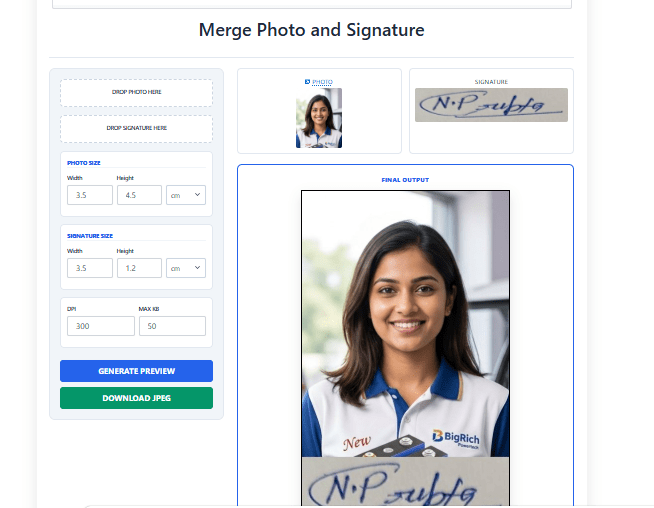
Merge Photo and Signature Online – A Free & Easy Way to Combine Images
“If you are filling out a government form that requires combining a photograph and a signature, you might lack the necessary software or know-how to merge them. To address this issue, CSC Designer has introduced a specialized tool that instantly combines your photo and signature into a single image of the required size, thereby saving the user a significant amount of time.”
What Does “Merge Photo and Signature” Mean?
Merging the photo and signature means combining them—with the photo sized correctly and the signature placed beneath it—so that both can be uploaded together into the form.
Photo Signature Add Online
If you are filling out a government form that requires a combined photo and signature, you can search for a designer online to create this specific format.
Why Do You Need to Merge a Photo and Signature?
Merging a photo and signature is required in many situations, such as
- Government exam forms (SSC, UPSC, Railway, Banking, NEET, CUET)
- Aadhaar, PAN, passport, and voter ID services
- Bank account opening & KYC verification
- School, college & university admission forms
- Job application portals
- Online affidavits and legal documents
- BANK photo and signature merge
- SBI photo and signature merge
- SSC photo and signature joint
- Railway photo and signature merge
- MPPEB photo and signature merge
- DSSSB photo and signature merge
- UPSC photo and signature merge
Without merging them correctly, forms may be rejected due to an incorrect upload format.
Benefits of Using an Online Photo and Signature Merge Tool
There are many benefits to using the CSC Designer tool for merging photos and signatures. You do not need to install any software on your mobile or computer; simply search for “CSC Designer” on Google, select the photo and signature merging tool, and upload your files to combine them.
How to Merge Photo and Signature Step-by-step guide
First, search for “CSC designer” or “www.cscac.in” on Google. Once the home page opens, search for the “merge photo and signature” tool in the search bar. When the tool opens:
1. Click the “drop photo” button and upload your cropped photo.
2. Click the “drop signature” button and upload your signature.
3. Adjust the photo size to the required dimensions.
4. Adjust the signature size to the required dimensions.
5. Set the DPI for the photo and signature.
6. Set the file size (in KB) for the merged photo and signature.
7. Click on “GENERATE PREVIEW” and download the image.
Frequently Asked Questions (FAQ)
1. Can I merge a photo and signature on mobile?
Yes, most modern online tools are fully responsive and mobile-friendly.
2. Which file format is best for uploading?
JPG or JPEG format is considered the best and most widely accepted format for government and academic forms.
3. Is using this online tool free?
Yes, this utility tool is 100% free to use with no hidden charges.
4. Can I resize the signature separately?
Yes, you can easily resize, adjust, and align the signature right below the photograph before downloading.
5. Will it reduce the image quality?
No, a high-quality online tool processes the images while maintaining their original sharpness and resolution.
6. Can I download the merged photo and signature in high quality?
Yes, the tool allows you to download the merged image in high quality without losing clarity.
7. Which image formats are supported?
The tool supports popular image formats such as JPG, JPEG, and PNG for both photos and signatures.
8. Is my uploaded photo and signature secure?
Yes, your uploaded files are processed securely and are not shared with third parties.
9. Can I use this tool for government exam forms?
Yes, the merged photo and signature can be used for many government job applications, online forms, and admission portals, provided they meet the required specifications.
10. Do I need to install any software?
No. This is a browser-based online tool, so you can merge your photo and signature instantly without installing any software.
Smart CSC Tools for CSC Operators, Cyber Cafes & Businesses
- Compress Image to 20KB Online (Bulk & Single) – Govt Form Photo Resizer
- Student ID Card Generator Online (Bulk Print Format) – Free CSC Tool
- School ID Card Maker Online (1-Click Auto Alignment) – HD PVC Print
- UPI QR Code Generator with Amount (Instant Download) – Free CSC Tool
- Payment QR Code Generator for Shop & CSC—High Resolution HD Print
- Compress all types of PDF
- Image to PDF Converter
- Location QR code Genrator
- PDF to Image Converter
- Visiting Card
- Student ID Card Design
- YouTube Thumbnail
- Hectare to Dismil Converter
- LIC Visiting Card For Insurance Advisor Full Editable
- Mobile Repairing Visiting Card
- Student ID Card Generator
- Merge Photo & Signature
- Bulk Image Crop Tools
- Resume & Bio-Data
- Modern LIC Visiting Card Design Full Editable for Insurance Advisor