
Compress Image
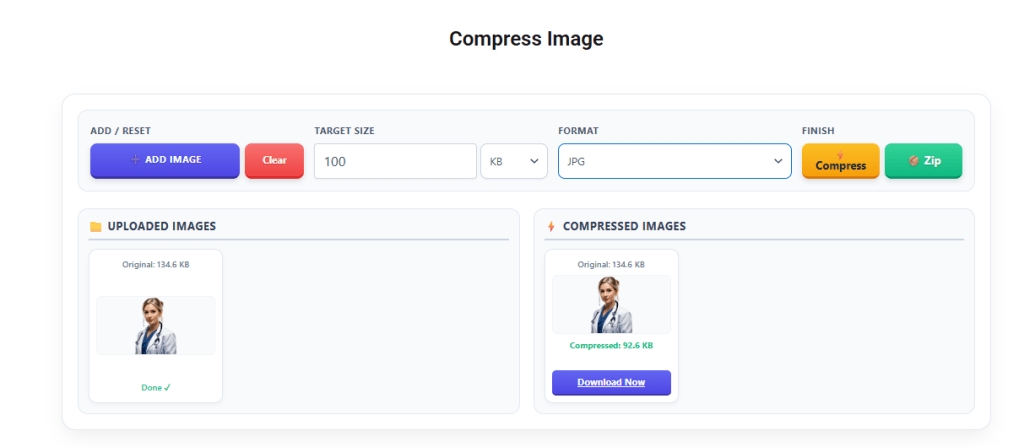
📁 Uploaded Images
⚡ Compressed Images
Helpful tools for daily use...
PDF Merger Combine PDF
Hectare to Dismil Converter
MM to Meter Converter
Currency Converter
Bio Data format For Professional Job
Bio data Format For Hindu Marriage
Insurance Advisor New LIC Visiting Card Design For LIC Advisor
LIC Visiting Card For Insurance Advisor Full Editable
Mobile Repairing Visiting Card
Compress Image to 20KB Online – Free Image Compressor
Compress JPG, PNG and supported images to 20KB or less for exam forms, job applications and online uploads.
✓ Free
✓ Mobile Friendly
✓ No Software Required
✓ JPG / PNG Support
Need to compress image to 20KB for an online form, exam application, job application, passport photo, government portal, or other upload requirement? You can reduce your image file size online without installing software.
With the CSC Designer Image Compressor, you can compress images to a specific target size such as 20KB, 30KB, 50KB, 100KB, 200KB, or 500KB. Upload your image, select the required file size, compress it, and download the optimized image.
Image compression is useful when a website accepts only a limited file size. For example, an application may require a photograph below 20KB, while another website may allow an image up to 200KB or 500KB.
This guide explains how to compress an image to 20KB online, how image compression works, which image format is best, how to maintain better quality, and what you can do when your image is still larger than the required size.
Compress Image to 20KB Online
If you need to reduce a JPG, JPEG, PNG, or supported image to approximately 20KB, you can use an online image compressor.
The basic process is simple:
Upload your image.
Select the target size as 20KB.
Choose the appropriate image format.
Start compression.
Check the resulting file size.
Download the compressed image.
For most photographs, JPG or JPEG is a practical choice because it can achieve a much smaller file size while maintaining reasonable visual quality.
If the original image is very large, the compressor may need to reduce the image dimensions as well as the quality to reach a target as small as 20KB.
What Does “Compress Image to 20KB” Mean?
Compress image to 20KB means reducing the digital file size of an image so that it meets a 20KB file-size requirement.
For example, suppose your original photograph is 2MB. An online application may allow only 20KB. The image therefore needs to be optimized significantly before it can be uploaded.
Image compression can involve:
Reducing image quality
Resizing image dimensions
Removing unnecessary metadata
Changing the image format
Applying compression algorithms
The objective is to make the file smaller while keeping the image clear enough for its intended purpose.
It is important to understand that 20KB does not necessarily mean exactly 20KB. If a website says “maximum 20KB,” a file of 18KB or 19KB may be acceptable. If the website specifies a minimum and maximum range, however, you should follow those requirements exactly.
How to Compress an Image to 20KB Online
You can compress your image online in just a few steps.
Step 1: Select Your Image
Choose the photograph, signature, document, or other image you want to reduce.
The original image may be several hundred kilobytes or even several megabytes.
Step 2: Upload the Image
Upload the image to the CSCAC Image Compressor.
Depending on the tool and image type, supported formats may include JPG, JPEG, and PNG.
Step 3: Set the Target Size
Enter or select 20KB as your target file size.
You can also select another target if the website requires a different limit, such as 30KB, 200KB, or 500KB.
Step 4: Select the Output Format
For normal photographs, JPG/JPEG is generally a good option for achieving a smaller file size.
PNG is more suitable when transparency or certain types of graphics need to be preserved.
Step 5: Compress the Image
Start the compression process.
The compressor attempts to reduce the image file size while retaining as much visual quality as possible.
Step 6: Check the Result
After compression, check the final file size and preview the image.
Make sure that important details such as faces, signatures, text, or document information remain readable.
Step 7: Download the Image
Once the compressed image meets the requirements, download it and upload it to the required website or application.
Why Do People Need to Compress Images to 20KB?
There are many reasons why users need a very small image file.
Online Government Forms
Some online application systems specify strict file-size limits for photographs, signatures, certificates, and other documents.
If the upload limit is 20KB, a large original photograph may be rejected until it is compressed.
Examination Forms
Students and applicants may need to upload photographs and signatures while completing examination forms.
The website may specify a maximum file size along with required image dimensions.
Job Applications
Recruitment websites can also require applicants to upload small photographs, signatures, or documents.
In such cases, knowing how to compress photo to 20KB can make the upload process easier.
Passport-Size Photos
Passport-style photographs are often resized and compressed before being uploaded to an online application.
However, file size is not the only requirement. Some websites also specify dimensions, aspect ratio, background, and format.
Website Optimization
Website owners also compress images to reduce page weight and improve loading performance.
However, forcing every website image to 20KB is not always appropriate. The ideal file size depends on the image dimensions, type, quality requirements, and where the image is being used.
How Image Compression Works
Image compression reduces the amount of data required to store an image.
A compressor can use several techniques.
Image Quality Reduction
Photographic images contain a large amount of visual information. Lossy compression removes some information to reduce the file size.
When the compression level becomes too aggressive, the image may show visible quality loss.
Image Resizing
A high-resolution image may contain millions of pixels.
For example, an image measuring 4000 × 3000 pixels contains far more data than a smaller image measuring 800 × 600 pixels.
Reducing the dimensions can make it much easier to reach a very small target such as 20KB.
Metadata Removal
Some images contain metadata related to the camera, software, date, or other information.
Removing unnecessary metadata can reduce the file size and may provide additional privacy benefits.
Format Optimization
The choice of format can have a significant effect on the final file size.
JPG is commonly used for photographs, while PNG is often useful for graphics and images requiring transparency.
Lossy vs. Lossless Compression
There are two common approaches to image compression.
Lossy Compression
Lossy compression removes some image information to achieve a significantly smaller file size.
This method is commonly used for photographs because it can provide a large reduction in size.
When you need to compress image to 20KB from a large original file, lossy compression may be necessary.
Lossless Compression
Lossless compression reduces file size without permanently removing image information.
It is useful when preserving the original image data is important, but the reduction may not be enough when an image needs to be reduced to an extremely small size.
Compress JPG to 20KB
JPG and JPEG are popular formats for photographs.
If you want to compress JPG to 20KB, upload the JPG image, select 20KB as the target, and start the compression process.
If the resulting image is still larger than 20KB, reducing the image dimensions may help.
For a photograph, a properly resized JPG can often provide a better balance between visual quality and file size than an extremely compressed large image.
Compress PNG to 20KB
It is also possible to compress PNG to 20KB, but the result depends heavily on the type of PNG image.
PNG is particularly useful for:
Transparent images
Logos
Icons
Graphics
Images requiring lossless compression
If your PNG is a normal photograph and transparency is not required, converting it to JPG may sometimes produce a smaller file.
The best format depends on the image and the requirements of the website where it will be uploaded.
Compress Photo to 20KB
A common requirement is to compress photo to 20KB for an online application.
Before compressing a photograph, consider the following:
Crop unnecessary background
Maintain the correct aspect ratio
Resize the image if required
Use a suitable image format
Compress the image gradually
Preview the final result
For photographs containing a face, avoid excessive compression that makes facial features blurry.
Remember that a 20KB requirement may be accompanied by a specific width and height requirement. Always check the instructions on the application website.
Compress Image to 30KB
If the required file size is 30KB instead of 20KB, the same compression process can be used.
To compress image to 30KB:
Upload the image.
Set the target size to 30KB.
Select the appropriate output format.
Compress the image.
Check the final size.
Download the result.
A 30KB target gives the image slightly more room for maintaining quality compared with a strict 20KB target.
Compress Image to 200KB
Users may also need to compress image to 200KB for applications, documents, certificates, and other uploads.
A 200KB target generally provides considerably more space for image quality than 20KB.
It can be useful for:
Application documents
Scanned certificates
Educational documents
Photographs
Official uploads
Always check whether the website says “maximum 200KB” or specifies a particular size range.
Compress Image to 500KB
For larger images, you may need to compress image to 500KB.
A 500KB target can be suitable for:
Blog images
Product photographs
Portfolio images
Website graphics
Larger online uploads
For website optimization, however, the best image size depends on the image itself. A smaller image is not automatically better if it causes noticeable quality loss.
Best Image Format for Compression
Choosing the correct format can help you achieve a smaller file size.
JPEG / JPG
JPG is usually suitable for:
Photographs
Passport photos
Profile pictures
Real-world images
Website photos
It offers good compression and is widely supported.
PNG
PNG is useful for:
Transparent images
Logos
Icons
Graphics
Images where lossless quality is important
Photographic PNG files can sometimes be much larger than equivalent JPG images.
WebP
WebP is a modern image format designed for efficient web delivery.
It can provide good compression while maintaining useful visual quality. However, when uploading to an online form, always use the format specifically accepted by that website.
How to Compress Image to 20KB Without Losing Too Much Quality
It is not always possible to reduce a large image to 20KB with zero quality loss.
However, you can reduce noticeable quality loss by following these tips.
Start With the Original Image
Always use the highest-quality original available.
Repeatedly compressing an already compressed image can produce poor results.
Crop Unnecessary Areas
Remove unnecessary background or empty space.
This can reduce the number of pixels that need to be stored.
Resize the Image
If the original image is extremely large, reduce its dimensions before applying aggressive compression.
Choose JPG for Photographs
If you do not need transparency, JPG is often a practical choice for photographs.
Preview Before Downloading
Always inspect the compressed image before using it.
For photographs, check the face and important details. For documents, make sure text remains readable.
Why Is My Image Still Larger Than 20KB?
Sometimes an image remains above the target size after compression.
This can happen because of several factors.
High Image Resolution
A very large image contains a lot of data.
Reducing the dimensions may be necessary.
Complex Image Details
Images containing detailed backgrounds, textures, trees, crowds, or other complex patterns can require more data.
PNG Format
A detailed photograph stored as PNG may be significantly larger than a JPG version.
Quality Setting Is Too High
If the compression quality remains high, the resulting file may not reach 20KB.
For a very small target, stronger compression or resizing may be necessary.
20KB or Less: What Should You Upload?
Always read the exact instructions on the website where you are submitting the image.
If the requirement says:
Maximum file size: 20KB
then a file below 20KB may normally satisfy the size limit.
For example:
18KB
19KB
20KB
may all meet a maximum 20KB requirement.
But if the website specifies:
10KB to 20KB
then the image should remain within that range.
File size is only one part of the upload requirement. Check the required dimensions, format, and aspect ratio as well.
Common Mistakes When Compressing Images
Compressing Too Much
Extreme compression can make photographs blurry and documents difficult to read.
Ignoring Dimensions
Some websites require specific image dimensions in addition to a file-size limit.
Changing the Aspect Ratio
Do not stretch or distort a photograph just to meet a size requirement.
Using the Wrong Format
A format that is inappropriate for the image can result in a larger file or unnecessary quality loss.
Compressing the Same Image Repeatedly
Repeated compression can gradually reduce quality.
Whenever possible, return to the original image and compress it again using the desired settings.
Compress Image to 20KB on Mobile
You can compress image to 20KB online using a smartphone, tablet, laptop, or desktop computer.
The basic process is the same:
Open the image compressor in your browser.
Select the image from your device.
Choose the required target size.
Compress the image.
Preview the result.
Download the compressed file.
No separate desktop software is necessary when using an online image compressor.
Image Compression for SEO and Website Performance
Image optimization is also important for websites.
Large images can increase page weight and may take longer to load, especially on mobile networks.
Properly optimized images can help with:
Faster page loading
Better user experience
Reduced bandwidth usage
Lower storage requirements
Improved mobile performance
However, website owners should choose an appropriate image size rather than automatically compressing every image to 20KB.
A blog banner, product image, thumbnail, and small icon may all require different dimensions and file sizes.
Security and Privacy When Using Online Image Compressors
Before uploading personal or sensitive images to any online service, consider its privacy and security practices.
When using an image compression website:
Check that the connection uses HTTPS.
Review the site’s privacy information.
Avoid uploading sensitive images to services you do not trust.
Check whether uploaded files are automatically deleted.
Download the compressed image and keep your own copy.
For important documents, always use a service you trust and follow its published privacy practices.
Frequently Asked Questions
Can I compress image to 20KB online?
Yes. An online image compressor can reduce the file size of a JPG, JPEG, PNG, or other supported image to a target such as 20KB.
Can I compress a photo to exactly 20KB?
The final file size depends on the original image, dimensions, format, and compression settings. A tool may produce a file very close to the target rather than exactly the same number of bytes.
Can I compress image to 20KB without losing quality?
When a large image is reduced to only 20KB, some quality reduction may be necessary. Using appropriate dimensions, format, and compression can help maintain acceptable quality.
How can I compress JPG to 20KB?
Upload the JPG image to the compressor, select a 20KB target, compress it, and check the resulting file size. If necessary, reduce the image dimensions.
Can I compress PNG to 20KB?
Yes, although PNG images can be more difficult to reduce to very small sizes, especially when they contain a lot of detail. If transparency is not required, JPG may be a better option for photographs.
Can I compress image to 30KB?
Yes. Select 30KB as the target size and compress the image using the same basic process.
How do I compress image to 200KB?
Upload the image, select 200KB as the target, compress it, and download the optimized file after checking the result.
Can I compress image to 500KB?
Yes. A 500KB target can be used for larger photographs, website images, product photos, and other files where more visual quality is required.
Why does my image become blurry after compression?
Very strong compression removes more image information. If the target size is extremely small, such as 20KB, noticeable quality loss can occur. Reducing dimensions carefully and choosing an appropriate format can improve the result.
Does image compression change the image dimensions?
Compression and resizing are separate processes, but some image compressors may resize images as part of the optimization process. Always check the final dimensions if an online form specifies them.
What is better: 20KB or 30KB?
Neither is universally better. The correct size depends on the requirement of the website or application. If a form allows a maximum of 20KB, use 20KB or less. If it allows 30KB, you can use the larger limit to preserve more quality.
Final Thoughts
Learning how to compress image to 20KB is useful for online forms, examination applications, job applications, government portals, document uploads, and many other digital tasks.
A good compression process is more than simply lowering image quality. The best results usually come from combining the right image dimensions, suitable format, and appropriate compression level.
If you need to compress JPG to 20KB, compress PNG to 20KB, or compress photo to 20KB, start with a clear original image and check the exact requirements of the website where you will upload it.
The same approach can also be used when you need to compress image to 30KB, compress image to 200KB, or compress image to 500KB.
Before submitting the final image, always verify its file size, format, dimensions, and visual quality. This helps prevent upload errors and ensures that your image meets the requirements of the application or website.
Use the CSC Designer Image Compressor to quickly reduce your image file size online and prepare your images for the required upload limit.